Collecting guides
Whatnot Pokémon Scanner: Check Live Cards with Brickify
Use Brickify's Whatnot scanner route in Browse & scan on iOS: pick Pokémon, confirm the exact printing, and review estimates before you bid.
Brickify's iOS app includes Whatnot entry points inside Browse & scan. Select Pokémon, then use Whatnot Web for card recognition or the Whatnot App option for results in Dynamic Island on a supported iPhone. Confirm the exact printing and condition before using an estimate to inform a bid.
A live auction compresses a collecting decision into a few moments. The useful preparation happens before that countdown: know which version you want, what details still need checking, and how much you are willing to spend in total.
Open the Whatnot Pokémon scanner in Brickify
- Open Brickify on iPhone and select Browse & scan from the bottom navigation.
- Choose Pokémon as the category you want to identify.
- Choose Whatnot Web for card recognition, or Whatnot App for results in Dynamic Island on a supported iPhone. Follow the setup shown for that option; availability can vary by device and app version.
- When a card is identified, compare the artwork, set, collector number and variant with the card the seller is showing. Recheck anything the stream does not show clearly.
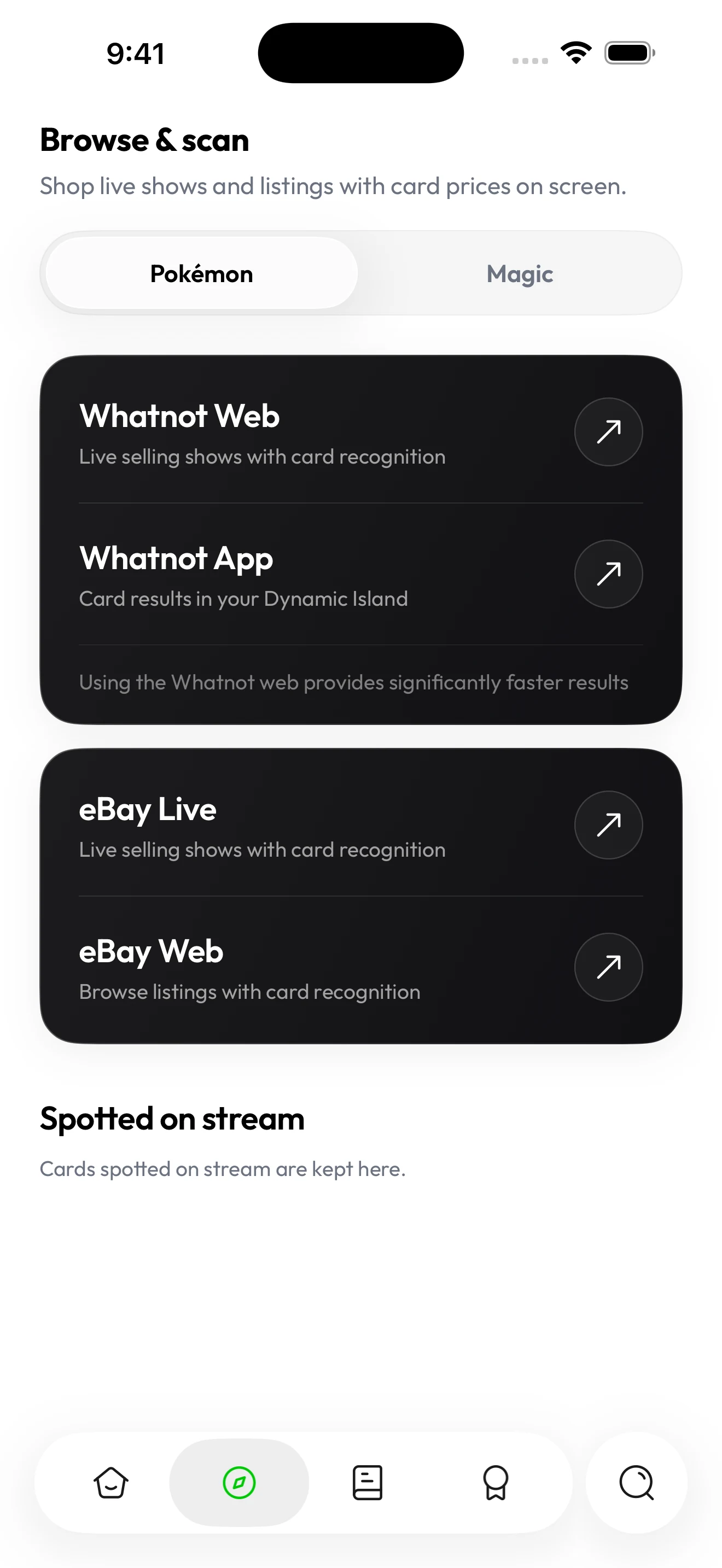
In the iOS app, Browse & scan offers Whatnot Web for card recognition and Whatnot App for results in the Dynamic Island. Select Pokémon before opening the destination.
Captured in Brickify on iPhone 17 Pro Max. View full-size screenshot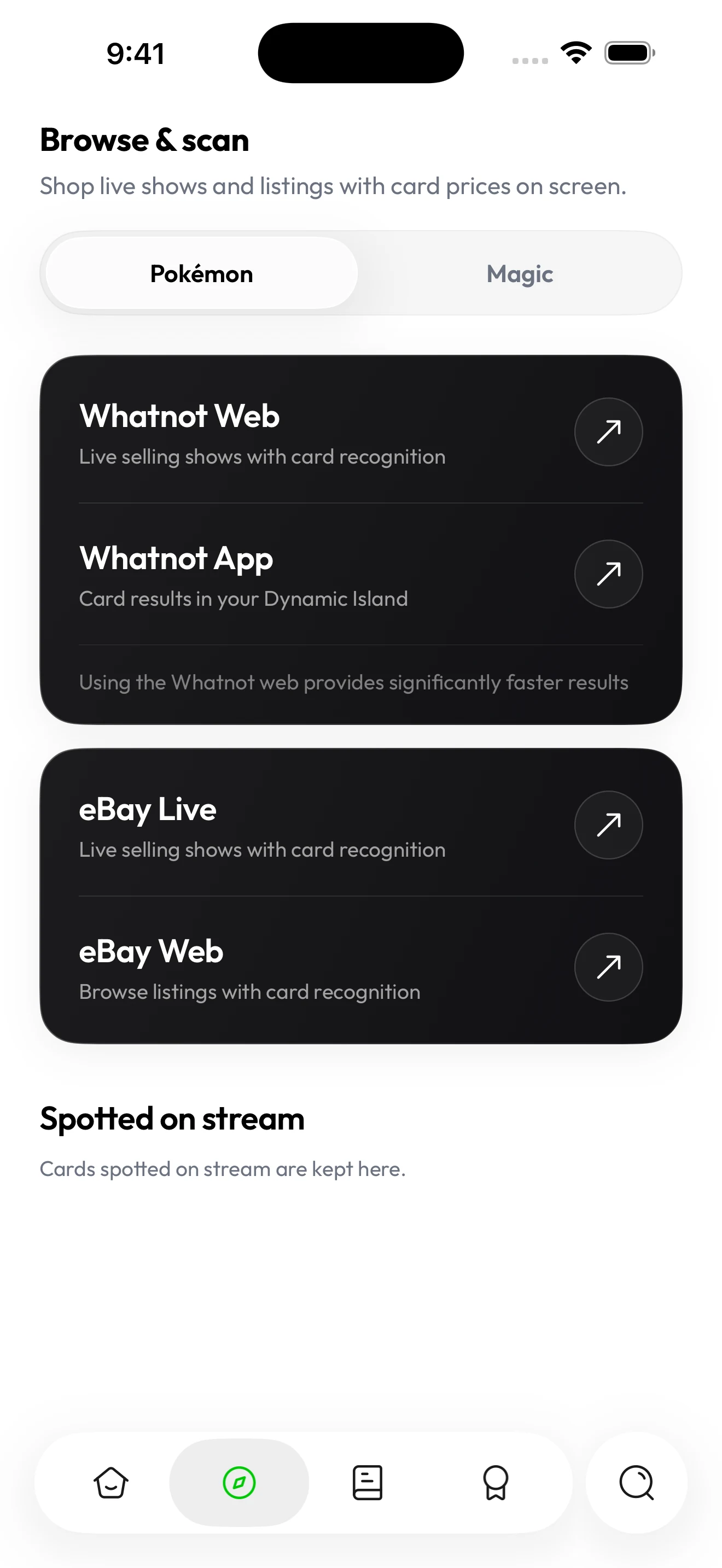
The screen above shows the two Whatnot entry points in the iOS app. An estimate is a reference for the identified printing; it does not establish the physical card's condition, authenticity or eventual sale price. Stream clarity and how much of the card is visible affect what you can actually verify.
Prepare a reference before the show
Use Brickify to look up the cards you are interested in and review the available estimates. If you already own a copy, scanning it can help confirm the printing you want to compare. Keep the set, collector number and variant with your notes so you are not relying on the character name alone.
Treat that reference as preparation for evaluating the listing. The card being offered may have a different finish, language or condition from the copy you researched.
Check the card that is actually being offered
- Confirm the name, set and collector number. Ask for a clearer view if small text is unreadable.
- Check the language, foil finish and any stamps or edition markings.
- Look at the front and back for visible wear. A sleeve or camera reflection can hide surface details.
- For a graded card, read the label and compare the same grading company and grade.
- Confirm what the purchase includes: one card, a group, a sealed item or another format. Do not apply a single-card estimate to a different type of purchase.
Lots, bundles and sealed items need different questions
- Bundles: ask which cards are included, then identify the few that carry most of the value. A single-card estimate does not transfer to a stack.
- Repacks and mystery packages: the contents are unknown before opening, so treat the price as the cost of the experience rather than a value you can check in advance.
- Sealed product: confirm the exact product name, the language and whether the seal and outer wrap are intact and undisturbed.
- Slabs: note the grading company, the grade and the certification number on the label, and compare only against the same company and grade.
- Fast camera passes: you can only verify what you clearly see. If a card is shown for a second and then set aside, treat its details as unconfirmed.
Set the total first, then work backward to the bid
Choose a total spending limit and account for applicable shipping, taxes and other purchase costs shown for the transaction. The maximum bid should fit inside that total. If those costs are unclear, resolve them before committing.
| Illustrative budget | Amount |
|---|---|
| Your total spending limit | $50 |
| Amount reserved for purchase costs | $8 |
| Maximum item price within that example budget | $42 |
These amounts illustrate the subtraction only; they are not Whatnot fee or tax rates. Your actual checkout costs depend on the purchase. A rising bid does not by itself establish that the card's market value has increased.
Give unclear information a firm stopping point
A countdown does not make an unreadable card number more reliable. If you cannot verify a meaningful detail, reduce the uncertainty before buying or pass on that lot. Likewise, a displayed estimate for a genuine catalog card is not proof that a physical copy is authentic.
Update your collection after the card arrives
Check the received card against the purchase details. Then scan it in Brickify, confirm its version, and update your collection and purchase record. Keep your order information available if the card differs from the listing.
Common questions
Where are Brickify's Whatnot scanner options?
In the iOS app, open Browse & scan and select Pokémon. Choose Whatnot Web for card recognition, or Whatnot App for results in Dynamic Island on a supported iPhone. Available options can vary by device and app version.
Is the current bid the same as a card's market value?
No. An auction bid is what someone has offered in that sale. Compare the actual card, its condition and your purchase costs with relevant estimates and comparable sales.
Can a card value estimate authenticate the auction item?
No. An estimate for an identified printing does not authenticate a physical card. Review the item yourself and seek specialist advice if authenticity is uncertain.
Do I need a subscription to scan during a show?
Free to download. Some features require Pro. Prices shown in USD; local pricing, available trials, renewal and cancellation terms are shown in the app before you subscribe. Brickify Pro reference pricing is $9.99/month or $89.99/year (USD).
The app for your collection
Put your Pokémon collection in focus.
Scan your cards, check their estimated value, and keep your collection together with Brickify.
Free to download · iPhone, iPad & Android
Explore the Pokémon scannerEstimates are a reference, not guaranteed sale prices. Brickify is independent of the owners of the collectible brands mentioned here.