One Piece card collection app
Your One Piece cards.
More than a stack of pulls.
Give new pulls and old favorites a place in your collection. Browse One Piece booster sets, save owned cards with quantities and purchase details, and follow estimated values in Brickify.
Free to download · iPhone, iPad & Android

In good company.Meet some of the creators who use Brickify.
 EvanTubeHD
 MasterBuilders
 The B3
 STUDS
STUDS Republic Studs
 DaniBobStudios
 Stud City
Open packs.
Keep track of the keepers.
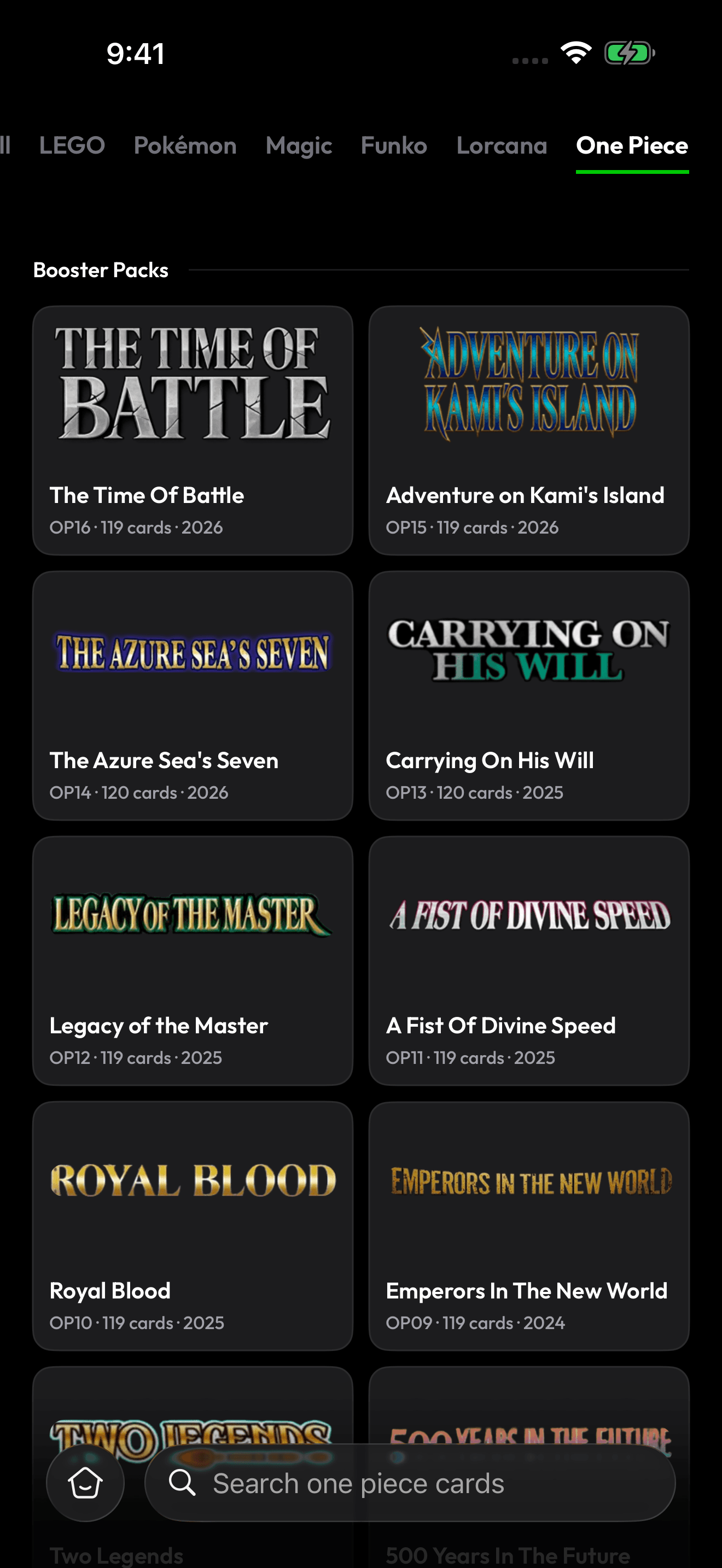
The One Piece catalogue in Brickify, with booster sets to browse as you organize your cards.
- 1. Start with the releaseBrowse the One Piece catalogue by set. Keep new pulls together until you have matched them with the right entries and saved what you own.
- 2. Compare the card, number and artworkUse the physical card to check its catalogue entry. A familiar character name is a starting point; the card number and version make the record useful.
- 3. Count copies before putting them awaySave quantities so your binder and spare copies are represented in your collection. Record purchase details while the transaction is still easy to remember.
- 4. Check what you have before buying againReview your collection before buying singles or planning a trade. Compare it with the set you want to complete and write down your next priorities.
- 5. Follow the collection beyond opening dayKeep track of estimated values over time, with Pokémon, Magic, Lorcana, LEGO and Funko available in the same app if your collection crosses categories.
Estimates are a reference, not guaranteed sale prices.
Reviews
In collectors’
own words.
“As a lifelong Lego collector and somebody that's into technology, this app is the perfect integration of both. With easy scan features for big lots, to value tracking and data storing. It's a 10/10. By far has the best user interface I've seen from any app of this kind. Also great customer service!”
“Really solid app for keeping track of my LEGO collection. The scanner works well, it's easy to use, and I like seeing what sets and minifigures I own. Makes organizing everything way easier. Definitely recommend it if you collect LEGO.”
“Love the app! Very helpful, as well as the creators constantly updating the app to make it more user friendly is a big plus for me. Highly recommend!”
Scan. Organize.
Keep collecting.
Explore Pro scanning and collection features. Choose your plan in the app and check the access included for your device.
- Camera scanning for supported items
- Advanced collection features
- Market values & price history
- Collection tracking & device sync
Monthly
$9.99/ month
Billed monthlyAnnual Best value
$89.99/ year
About $7.50 a month, billed annuallySubscribe to Pro inside the app. Free to download. Some features require Pro. Prices shown in USD; local pricing, available trials, renewal and cancellation terms are shown in the app before you subscribe.
What should I look for in the best One Piece card app?
For collecting, prioritize finding the right card, saving accurate quantities and keeping purchase records. Check that the app’s catalogue suits the releases you collect. Brickify brings One Piece collection tracking and estimated values into the same app as five other collecting categories. If you need deck building or tournament tools, include those as separate requirements.
How do I organize One Piece cards after opening packs?
Keep the cards grouped by release, then compare each card with its catalogue entry. Save the cards you own, add quantities and review the group before putting it into a binder or storage box. This makes it easier to avoid counting the same pulls twice.
Can I track duplicate One Piece cards?
Yes. Use quantities to record matching copies. Compare the card number and version before combining them into a single quantity, especially when the artwork or finish differs.
Can I use Brickify to plan a One Piece set collection?
Browse the set and record the cards you own first. Compare those records with your collecting goal, then keep a separate list of the cards you want next. Choose whether you are collecting particular characters, one release or specific versions so the next purchase serves that goal.
How do I check what my One Piece cards are worth?
Start with the exact card and version in your collection. Review its estimated value, then check the physical card’s condition before comparing current buying or selling offers. Estimates help you understand the collection; they are not a promise of a sale price.
Can I keep One Piece, Pokémon and Lorcana together?
Yes. Brickify supports One Piece, Pokémon, Disney Lorcana, Magic: The Gathering, LEGO and Funko, with quantities and purchase details for the items you save.
Is the One Piece collection app on iPhone and Android?
Yes. Download Brickify from the App Store for iPhone and iPad, or Google Play for Android. The screenshots shown here are from the iPhone app.
Is Brickify free to download?
Free to download. Some features require Pro. Prices shown in USD; local pricing, available trials, renewal and cancellation terms are shown in the app before you subscribe. Brickify Pro reference pricing is $9.99/month or $89.99/year (USD).
Also in Brickify
More to collect,
in the same app.
From the Brickify Journal.
More from the Journal
From the next pack
to your whole collection.
Browse One Piece sets and start recording the cards you own.
Free to download · iPhone, iPad & Android