Collecting guides
Pokémon Scanner Accuracy: How to Get the Exact Card Right
Identify the exact Pokémon card in Brickify. Check set, collector number and finish, fix glare and overlap, and judge scanning speed by the cards you save correctly.
An accurate Pokémon scan matches the printing you own, not only the character name. In Brickify, confirm the set, collector number, artwork and variant, then judge condition separately before you rely on a value estimate.
A Charizard match can still be the wrong Charizard. Artwork, collector number, set, language and finish are what narrow an identification to the card in your hand. Start with the smallest distinguishing detail before a result becomes a saved record.
Check these details in order
- Name and artwork: confirm you are looking at the same card design, not another illustration of the same Pokémon.
- Set and collector number: compare the printed identifier with the result, including any letters used in a subset or promo number.
- Variant and language: look at foil treatment, stamps and other visible differences.
- Physical condition: inspect the actual card. Do not infer condition from a clean catalog image.
- Price basis: compare a raw card with a raw estimate, or a graded card with the matching grading company and grade where that data is available.
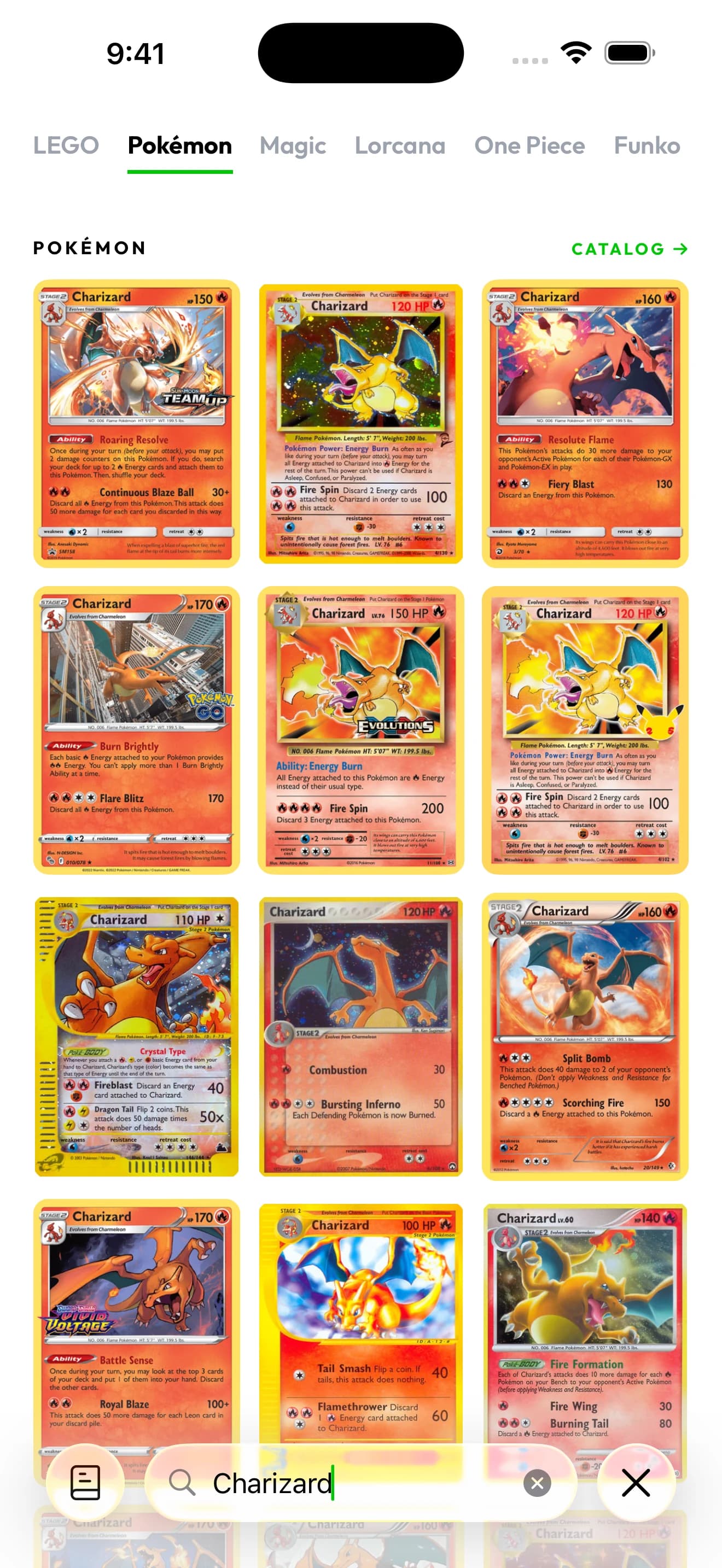
Search results put different Charizard printings side by side. Match the artwork, set and collector number before saving a card.
Captured in Brickify on iPhone 17 Pro Max. View full-size screenshot
Fix the image before you scan again
| Problem | Likely image issue | Next step |
|---|---|---|
| No match | Likely image issueThe card is small, blurred or partly hidden. | Next stepFill more of the frame with one card and hold steady. |
| Wrong printing | Likely image issueSmall identifiers cannot be read clearly. | Next stepTake a closer individual scan and verify the set and number. |
| Foil or sleeve trouble | Likely image issueA bright reflection hides part of the card face. | Next stepChange the light angle and keep the card readable. |
| Missing cards in a batch | Likely image issueOverlap or distance makes individual cards hard to distinguish. | Next stepReduce the group and separate the cards. |
| Unexpected value | Likely image issueWrong variant, wrong condition or the wrong price basis. | Next stepRecheck the match before drawing any conclusion about price. |
Accuracy, condition and authenticity are separate questions
Identification asks which card an image resembles. Condition describes wear on the physical copy. Authenticity asks whether that copy is genuine. A camera identification on its own does not settle the second and third questions.
A copied image on a counterfeit can resemble a real card, and a genuine card can be damaged on the back while the front looks clean. Use clear front and back photos plus physical inspection whenever a decision depends on condition or authenticity.
Which Pokémon scanner is the most accurate?
For your binder, the question worth answering is narrower: does the app return the exact printing, and does it let you keep correct records afterwards? Brickify is built for that sequence. Identification, available value estimates and collection tracking sit in one app on iPhone, iPad and Android, so a confirmed printing becomes a saved item with a quantity rather than a screenshot you have to retype later.
Judge it on cards that reflect what you actually collect: two printings of the same character, a foil, a duplicate and a visibly worn card. A universal “most accurate” verdict would require a defined test across identical cards and conditions, and you do not need that ranking to build reliable records today. Give the scanner a clear view, check the identifying details and resolve uncertain matches before saving.
What is the fastest way to scan Pokémon cards?
Use live scanning for a single card, and a multiple-card photo when the cards can be clearly separated. The real finish line is a correctly saved group, rescans and corrections included. Set difficult cards aside in a small review pile so one reflective sleeve does not stall the rest of your sorting.
| Your situation | Try this workflow | Review before saving |
|---|---|---|
| One new pull | Try this workflowIndividual live scan. | Review before savingArtwork, set, number and finish. |
| Several clearly visible cards | Try this workflowMultiple-card photo scan. | Review before savingEach returned printing, plus any card the batch missed. |
| Reflective sleeves or a crowded binder page | Try this workflowAdjust the light or scan a smaller group. | Review before savingSmall printed identifiers stay readable. |
| Several copies of one card | Try this workflowConfirm the printing, then record the quantity you own. | Review before savingDifferent artworks or finishes are not quietly counted as the same card. |
A five-card check you can repeat
- Pick five cards whose printings you already know, including a foil and two cards of the same character.
- Write down each expected set and collector number. That list is your reference.
- Scan and compare every result with the list, noting wrong and missing matches.
- Correct the results and save the actual quantities. Count that review time as part of the job.
- If glare or crowding caused the trouble, change the layout and repeat with the same five cards.
Treat this as a setup check for your own lighting and binder, not a published performance figure. Its purpose is to show which capture mode suits your cards and where an individual scan or a closer look pays off.
Keep a collection record you can reuse
Accuracy only matters if it survives into your records. Confirm the printing, judge condition separately, save the quantity you own, then update the collection after trades and sales so both the inventory and the estimated total stay useful. Estimates are a reference, not guaranteed sale prices. If your shelves hold more than cards, the same account also tracks LEGO minifigures and sets alongside your binder.
Common questions
How accurate is the Brickify Pokémon card scanner?
Results depend on the card and the image quality. Confirm the set, collector number, artwork, language and finish before saving. A clear individual photo helps when a reflective sleeve or a crowded batch hides those details.
Why does a Pokémon scanner show the wrong value?
Check the printing, finish, language and condition first, then whether the estimate is raw or graded. A correct character name attached to the wrong version leads to the wrong reference value.
Does scanning a Pokémon card prove it is real?
No. Recognition identifies a card image; authenticity depends on the physical copy. Inspect the card yourself and seek a qualified assessment when a purchase or sale hinges on authenticity.
What is the fastest way to scan a stack of cards?
Separate the cards so each one is fully visible, scan them as a group, and move glare-prone or overlapping cards into a small pile for individual scans. Review every returned match and quantity before saving the batch.
Is Brickify free?
Free to download. Some features require Pro. Prices shown in USD; local pricing, available trials, renewal and cancellation terms are shown in the app before you subscribe. Brickify Pro reference pricing is $9.99/month or $89.99/year (USD).
Sources & further reading
The app for your collection
Put your Pokémon collection in focus.
Scan your cards, check their estimated value, and keep your collection together with Brickify.
Free to download · iPhone, iPad & Android
Explore the Pokémon scannerEstimates are a reference, not guaranteed sale prices. Brickify is independent of the owners of the collectible brands mentioned here.